

Dokibird's Soup Shop
Dokibird's Soup Shop is a two-week solo-developed cooking game created for Doki Jam's "Chain Reactions" theme. I designed and implemented the game's core cooking system, level flow, customer interactions, and narrative progression entirely in Unreal Engine 5.
Role: Solo Developer / Game Designer
Team: 1
Development: 2 weeks
Engine: Unreal Engine 5
Tools: Blueprints / Maya / GitHub / Photoshop
Design Challenges
Navigation
How could I teach players a multi-step cooking system without interrupting the gameplay with a traditional tutorial?
-
I used the kitchen layout, recipe labels, customer orders, and gradually increasing recipe complexity to teach the system through play.
How can I make a game solo within the 2 week time constraint?
-
Firstly, I focused on a standout mechanic, which was the soup making.
-
I used data tables to cut development time while still producing unique results in soup and customers.
-
Prioritize gameplay over polish
-
I kept track of daily goals and scope. After the first day, I had already planned out the entirety of the next 2 weeks.
Game Design | Level Design

1: LEARN
2: PREPARE
3: REFERENCE
LEVEL DESIGN - Teaching without a tutorial
1: LEARN
| With the large posters
As soon as they turn around, players are introduced to the basic soup-making process before interacting with the kitchen.
2 : PREPARE
| Bowls → Soup Base → Ingredients
The physical arrangement from left to right mirrors the order in which players perform the cooking actions.
3 : REFERENCE
| Recipe poster and reference photos directly above where each ingredient is stored
Once players reach the ingredients, they have the information needed to begin experimenting with recipes.
I placed information where players would naturally need it rather than presenting all of the instructions at the beginning.
.png)
Gameplay Progression
-
I structured the gameplay to gradually introduce core mechanics and build player engagement.
-
Players begin with simple and low stress recipes, then progress to harder recipes and varied customers.
-
Each successful recipe allowed the narrative to move forward.
-
This flow created a difficulty curve while maintaining player interest, ensuring that each step of the process felt rewarding and built toward the next challenge.
Simple recipe - > Learn ingredient interaction -> Introduce more ingredients -> More demanding customers -> Narrative Events

Pacing Through Customer Design
I used friendly and unsettling customers to alternate between moments of low and high tension. Friendly customers gave players time to recover, while unusual customer interactions created anticipation and reinforced the game's gradually darker tone.
Blueprinting

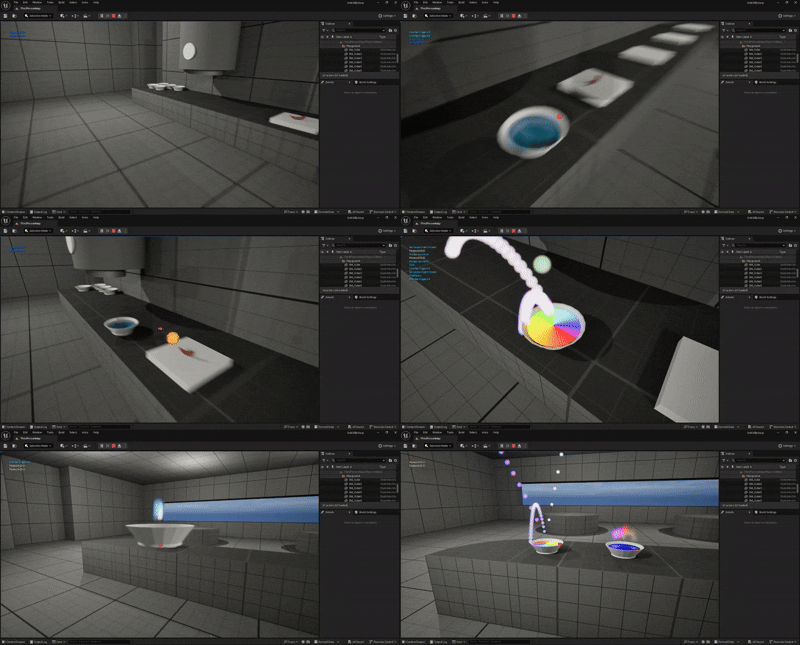
I built the soup system using data tables and structs so recipes and their reactions could be managed independently from the core interaction logic.
-
This also made editing recipes and customer orders quick and convenient. Good for a small game with a tight deadline.
-
For customer orders, I used a seperate data table that would take from the recipe data table, because some customers add special ingredients to certain recipes, and some don't.
Check for a Bowl with Soup Base → Check Ingredient/s → Recipe Match in Data Table Check →
Recipe Match! → Reaction → Result
-
When the bowl interacted with the serving table, it would check for the right results. If the results matched the customer's order, the order is a success!
Soups and Orders

-
I made a dialogue data table for each customer with unique dialogue and a struct.
-
I created a blueprint that managed when to fire the dialogue, and which dialogue to fire depending on the customer and their state.
Dialogue

-
To fix errors found in playtesting, I used breakpoints and print strings to help pinpoint where the bug was within my code.
-
I continued this process until I found where the code was firing wrong, and read the code to find what was causing it.
Debugging through playtesting: Putting myself in the player's shoes
PROBLEM 1: Ingredients not stored correctly
-
Problem: The soup system wasn't storing ingredients in the correct order, thus not recognizing the recipes.
-
Investigation: I traced the issue back to how ingredients were being identified in the Data Tables and Soup Bowl Blueprints.
-
Solution: I established consistent ingredient names and stored them in the bowl in order so the system could reliably store and compare them.
-
Result: The soup system could correctly recognize ingredient combinations.
PROBLEM 2: What happens when players make the wrong soup?
-
Problem: Players could accidentally create an incorrect combination with no convenient way to recover, since there are limited bowls.
-
Design Response: I added a trashcan that allows players to completely discard an incorrect soup and immediately continue experimenting.
-
Result: Mistakes became recoverable rather than frustrating, allowing players to stay in the cooking loop.
Production

-
As the sole developer working under a short deadline, I managed the project by planning daily goals, tracking progress, and making strategic scope cuts when necessary to ensure the game was completed on time.
-
I sometimes dedicated certain days to either design, art, programming, or playtesting.
EXAMPLE DAY [BLUEPRINTING] :
-
New Blueprinting: Allow the next customer to come after the previous customer is seated in the right spot.
-
Create next customer system
-
Create walks and customer spots
-
-
Bug Fixing: Fix the Customer Recognition System
-
Within "customer manager" swap "current customer"
-
Custom events: “movetoexit” and “Exitdialogue”, in customer1 be in “CustomerManager” so you can swap current customers
-
“OrderingCounter” it is hardcoded to customer1. Change that by making it check what the current customer is in CustomerManager before checking if the order is correct
-
Fixed bug: Customer will keep recognizing that the order is good and taking the soup even if the order is already completed
-
2 WEEKS TO SHIP

-
When bugs reduced the time available for polish, I prioritized the game's core cooking mechanic and adapted the narrative and visual design around the remaining scope rather than removing the game's intended tone entirely.
ORIGINALLY PLANNED:
-
Entire environment becoming increasingly disturbing.
-
More dialogue options.
FINAL VERSION:
-
Focused on having one disturbing character.
-
Mostly streamlined dialogue.
CUTS